CAN, plainly · CANA-4
Why one module reads on any ECU
Every aftermarket ECU with a CAN port speaks the same CAN. What differs from one to the next is not the protocol but a handful of numbers: which identifiers it listens for, how fast the bus runs, which byte comes first, and what a count means. The CANA-4 makes each of those a setting on its page, so one firmware talks to all of them.
Written from ISO 11898, the ECU makers' own CAN documentation, and the module's firmware, September 2026.
00The same two wires
CAN is one bus: two wires, CAN H and CAN L, twisted together, with a 120 Ω terminator at each end. Every device on the bus hears every frame. There are no addresses and no master. A device puts a frame on the bus when the bus is free, and every other device decides for itself whether that frame is one it cares about.
A Link, a Haltech, a MoTeC, an ECUMaster, a dash and a logger all attach to that pair the same way. The wiring, the voltages and the frame format are the standard's, CAN 2.0B, and nothing about them belongs to a vendor.
01What a frame is
An identifier, up to eight bytes, and a checksum the hardware handles. The identifier says what the frame is; the bytes mean whatever the sender and the receiver agreed. That agreement is the whole of a "CAN protocol": when a vendor publishes one, it is a list of identifiers and what the bytes in each mean. The CANA-4's is two identifiers long.
02What differs between ECUs
| Setting | What it decides | The CANA-4's default |
|---|---|---|
| Bit rate | How fast the bus runs. Every device on one bus must agree; a device at the wrong rate corrupts every frame on it. | 500 kbit/s, from 50 kbit/s to 1 Mbit/s |
| Identifier | Which frame is which. 11-bit on most buses, 29-bit on some. It must be one that nothing else on the bus uses. | 0x6E0 data, 0x6E1 status |
| Byte order | Whether a 16-bit value's high byte comes first (MS first, big-endian, Motorola) or last (LS first, Intel). Link's and Haltech's own streams put it first. | MS first, settable per value |
| Sign and width | Whether a value can be negative, and whether it takes one byte or two. | Signed, 16 bits |
| Scale and offset | What one count means: 0.1 °C, 0.1 kPa, 1 mV, 0.01 AFR. The receiver multiplies back. | The sensor's own unit |
| Position and rate | Which bytes hold which value, and how often the frame is sent. | Bytes 0, 2, 4 and 6; 20 Hz data, 5 Hz status |
| ECU | Reads a user-defined frame as | Where it stands |
|---|---|---|
| Link G4X, G5 | A Receive User Stream in PCLink, onto CAN Analog channels | Guide, from Link's documentation |
| Haltech Nexus | Generic CAN, in NSP 1.48 or later | Guide, from Haltech's documentation |
| Haltech Elite | Nothing: the Elite takes no user-defined CAN input | Not supported |
| ECUMaster, MoTeC, RaceCapture | A user-defined CAN input, each in its own software | Not yet written up |
| AEM | AEMnet, 29-bit identifiers at 500 kbit/s | Unconfirmed |
| Dashes and loggers | Most import a DBC file, which the module writes for its own layout | By the DBC |
03What the module does about it
Every row of the first table is a setting on the CAN tab of the module's page, and the table behind it goes further: up to four frames, each with its own identifier, length and rate, and up to eight values in each, every value with its own position, width, sign, byte order, scale and offset. An ECU whose receive feature cannot be bent to the module's frames is met by bending the module's frames instead, from a phone, with no firmware per ECU. The layout comes out as text and as a DBC file.
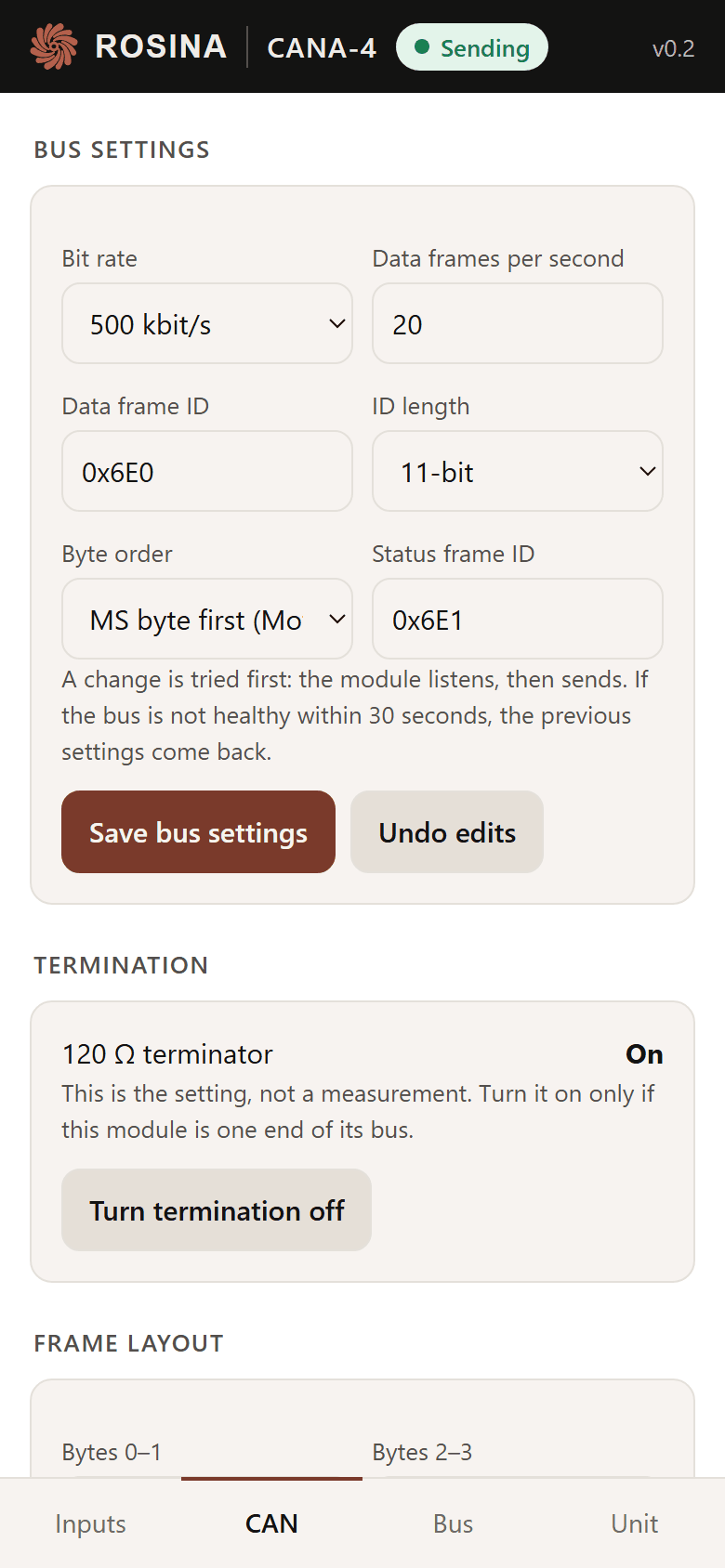
Out of the box the module is set up for a Link: 500 kbit/s, identifiers 0x6E0 and 0x6E1, MS first, four signed readings at 20 Hz. A Haltech Nexus reads the same frames at its bus's 1 Mbit/s. Anything else is a few fields.
04What it will not do to your bus
A device that transmits can take a bus down, so the module earns the right to:
- Silent at power-on. It listens first, and will not transmit at a bit rate the bus is not running.
- It will not take an identifier in use. One it hears another device sending on, it refuses, and its Bus tab says so.
- A change is on probation. A new bit rate or identifier that the bus never acknowledges is undone after 30 seconds.
- Bus load is capped. The page shows what the frame table takes of the bus at the chosen bit rate, and the module refuses a table above 30 %.
05What it does not reach
- CAN FD. The module is classic CAN 2.0: eight bytes a frame, 1 Mbit/s at most.
- Protocols that talk back. J1939 address claiming, OBD-II requests, and posing as a vendor's own expander box. The module only transmits.
- Bit-level fields, 32-bit and floating-point values, multiplexed frames. Byte-aligned 8- and 16-bit values cover every expansion module we surveyed.
- Receiving. The module reads the bus only to protect it: to check the rate, to spot its own identifiers in use, and to count the traffic.
Full specifications, wiring and the frame layout are in the datasheet (PDF); the headline specs are on the CANA-4 page. Setup on each ECU: the guides.
The CANA-4 isn't on sale yet. Leave your email on the store page to hear when it ships.
Written from:
- ISO 11898-1, the CAN data link layer and physical signalling, and CAN 2.0B
- Link: CAN Setup
- Haltech: Introducing Generic CAN
- Haltech technical library: CAN protocol information